A marathon pace chart converts your goal finish time into exact per-mile and per-kilometer paces, plus ready-to-use checkpoint splits you can write on your wrist before the gun goes off. The Apexa Pro interactive calculator does this instantly, no sign-up required, with a miles/km toggle and a printable pace band you can carry on race day.
Here is what a 3:30:00 goal looks like at a glance:
- Goal time: 3:30:00
- Pace per mile: 8:01 min/mi
- Pace per km: 4:59 min/km
- Halfway split (13.1 mi): 1:45:00
- 5-mile checkpoint: 40:05
McMillan Running recommends building your plan around standard checkpoints like the 5K, halfway, and every 5-mile mark. MyRunningPace describes pace charts as pre-calculated tables built precisely for this kind of quick checkpoint lookup, so you never do mental math mid-race.
Key Takeaways
A marathon pace chart is most useful when paired with a printable pace band and a clear split strategy chosen before race day, not during it.
| Point | Details |
|---|---|
| Use the calculator first | Enter your goal time into Apexa Pro to get exact per-mile, per-km, and checkpoint splits instantly. |
| Print a pace band | Write your halfway split and 5-mile checkpoints on your wrist or a band before the race. |
| Start conservatively | Run the first half at goal pace or slightly slower to protect glycogen through mile 20. |
| Adjust for conditions | Add 5–15 seconds per mile for climbs or heat above 60°F; build these into your pace band. |
| Apexapro pace tool | Apexapro's free browser calculator provides splits, unit toggle, and a printable pace band with no sign-up. |
Table of Contents
- What does a marathon pace chart show you?
- How to read the pace chart and use it on race day
- Which pacing strategy should you use for a marathon?
- Quick-reference paces for five common goal times
- Why the calculator-plus-pace-band workflow actually works
- Apexa Pro's free marathon pace calculator is ready to use now
- Sources
What does a marathon pace chart show you?
Pace charts typically present paces in 30-second or 1-minute row increments across a finish-time range wide enough to cover everyone from a sub-3:00 qualifier to a 6:00+ first-timer. Each row gives you the pace per mile, pace per kilometer, and the time you should reach key checkpoints.
The Apexa Pro marathon pace calculator covers finish times from under 2:30 through 7:00, with 1-minute resolution. Enter your goal time, toggle between miles and kilometers, and choose even or negative splits. The tool returns your per-mile pace, per-km pace, every 5-mile split, and a halfway split. A printable pace band option lets you export that data as a PDF you can tape to your wrist or tuck into your pocket, following the same format race directors use for on-course pacer reference.
Strava's running pace calculator takes a similar approach, converting an expected pace into estimated finish times across common race distances and listing checkpoint times for multi-distance lookup. MarathonHandbook's pace calculator also returns per-mile and per-km pace for a target time and offers printable pace bands with unit conversions.
For runners who want a full reference matrix, running pace conversion tools supply a grid that maps minutes-per-mile to finish times across distances from 5K to the marathon, useful when you are training across multiple race distances at once.
Sample pace rows across common goal times:
| Goal Time | Min/Mile | Min/Km | Halfway Split | 5-Mile Split |
|---|---|---|---|---|
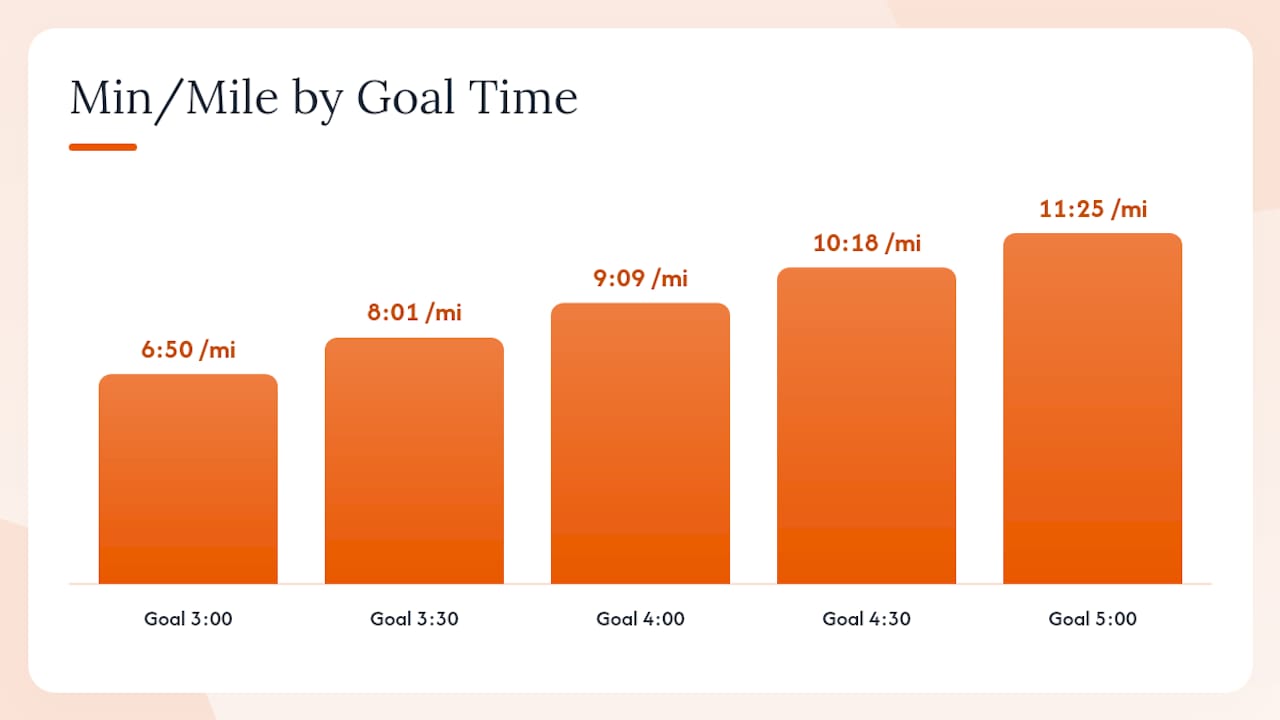
| 3:00:00 | 6:50 | 4:15 | 1:30:00 | 34:15 |
| 3:30:00 | 8:01 | 4:59 | 1:45:00 | 40:05 |
| 4:00:00 | 9:09 | 5:40 | 2:00:00 | 45:45 |
| 4:30:00 | 10:18 | 6:20 | 2:15:00 | 51:00 |
| 5:00:00 | 11:25 | 7:00 | 2:30:00 | 57:00 |
Comprehensive pace charts add min/mi, min/km, mph, and kph columns alongside effort-zone labels, so you can match each pace row to your GPS watch display and your training zones simultaneously.
How to read the pace chart and use it on race day
Reading a running pace table takes about 30 seconds once you know the structure. Find your goal finish time in the left column. Read across: the next column is your required pace per mile, then pace per kilometer, then your halfway split, then your 5-mile checkpoints. That row is your race plan.
Step-by-step:
- Locate your goal time in the finish-time column.
- Note your pace per mile and pace per km (both matter if your watch toggles units).
- Write your halfway split and at least two 5-mile checkpoints on a pace band.
- Set your GPS watch to display lap pace and program alerts at each checkpoint mile.
A few practical details runners often overlook. GPS drift on a certified marathon course can add 0.1–0.2 miles to your watch distance by the finish, which means your watch pace may read 5–10 seconds slower than your actual pace at any given point. Run by feel and checkpoint time, not solely by instantaneous watch pace. Treadmill paces also differ slightly because belt speed is calibrated in mph, not min/mile, so rounding can shift your displayed pace by a few seconds.
For training, use the pace chart to set tempo run targets. A 4:00 goal runner should run tempo miles at 9:09 min/mi. Long runs typically land 60–90 seconds per mile slower than goal pace, while shorter target-pace repetitions (800m to 1-mile) can be run at or slightly faster than goal pace to build efficiency.
Pro Tip: Write your halfway split and your 20-mile split on the inside of your wrist with a permanent marker. Glance at it once at each checkpoint, not every mile. Constant watch-checking disrupts rhythm and burns mental energy you need for miles 20–26.
Race-week prep checklist:
- Generate and print your pace band from the calculator
- Set GPS watch lap alerts at miles 5, 10, 13.1, 18, and 20
- Confirm your watch displays the same units (mi or km) as your pace band
- Write two key splits on your wrist as a backup
Which pacing strategy should you use for a marathon?
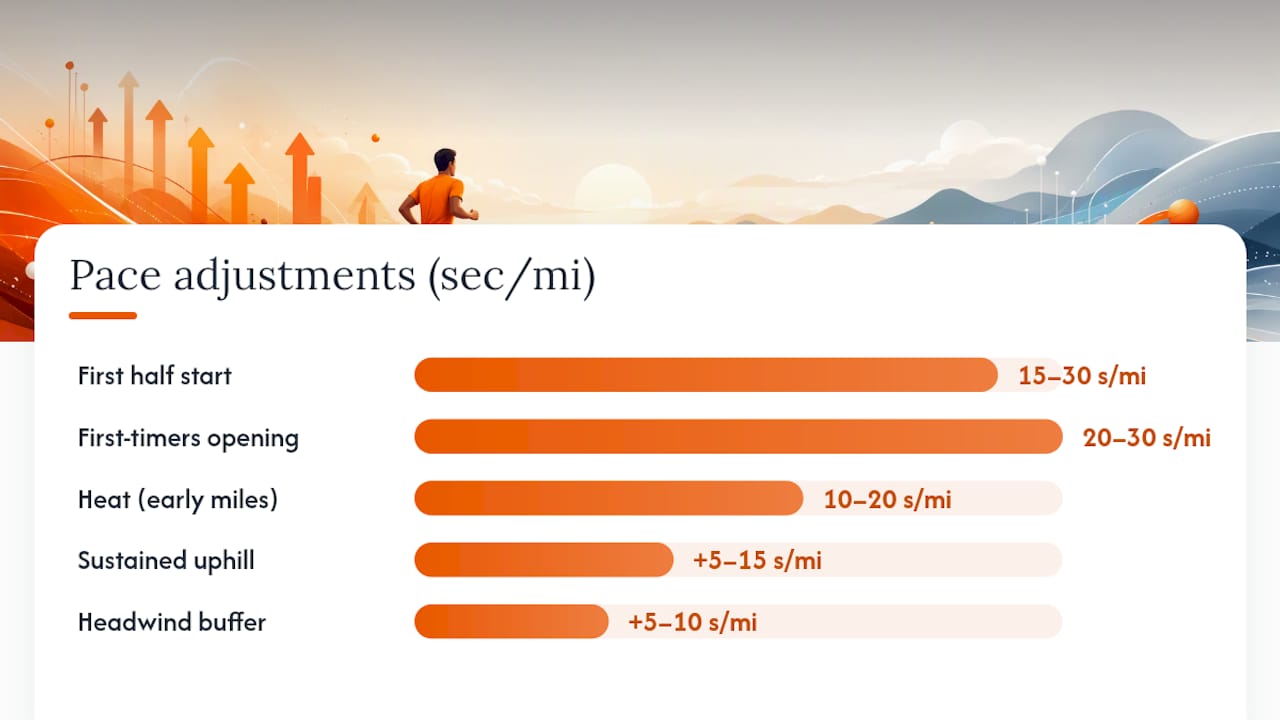
The default recommendation from coaches, including the approach behind McMillan Running's pace chart tools, is an even-to-slightly-negative split. Run the first half at goal pace or 15–30 seconds per mile slower, then hold or gradually accelerate through miles 20–26. This approach preserves glycogen and reduces the risk of hitting the wall, which typically occurs when runners go out too fast and deplete muscle glycogen before mile 20.
Negative splits are often more effective than strict even splits for marathon performance because running slightly slower in the first half preserves glycogen and reduces the risk of hitting the wall. Coaches quantify this as a small percent difference rather than a dramatic change.
The right strategy depends on your experience level. First-timers benefit most from a conservative start, running the opening 10K at 20–30 seconds per mile slower than goal pace and letting the crowd energy settle. Experienced runners chasing a specific time can run even splits from the gun, provided their training has included multiple 20-mile long runs at goal pace. A slight negative split, where the second half is 1–2 minutes faster than the first, suits runners who have raced several marathons and know their late-race capacity.
Course and weather adjustments:
- Add 5–15 seconds per mile for sustained uphill sections; subtract a similar amount for long net-downhill stretches, per guidance from MyRunningPace.
- In heat above 60°F, slow your first 10 miles by 10–20 seconds per mile and recalibrate at halfway.
- Strong headwinds in the first half justify an extra 5–10 seconds per mile of buffer.
Nutrition timing maps directly to your splits. For a 4:00 goal runner, the first gel lands around mile 6 (roughly 55 minutes in), with subsequent gels every 45–50 minutes. Write gel timing on your pace band alongside mile splits so you are not calculating on the fly. Wearable tech that tracks real-time output, as discussed in research on athlete output monitoring, can help you confirm you are holding target pace through the early miles without overcooking the effort.
Pro Tip: Create a terrain-adjusted pace band if your course has significant hills. Add your adjusted splits for known climb sections so you have a target for that mile, not just the flat-course average. This prevents panic math when your watch shows a slower pace on a climb.
Quick-reference paces for five common goal times
The table below covers the five most common marathon targets. The "Negative Split" column shows a first-half pace that is approximately 1% slower than goal pace, a small buffer that protects against early fade.
For a deeper matrix that maps minutes-per-mile to finish times across all common race distances, the running pace conversion chart at runningpaceconversion.com is a practical multi-distance reference. Understanding how performance benchmarks are set for athletes also helps you interpret where your goal time sits relative to your current fitness and training paces.
Why the calculator-plus-pace-band workflow actually works
Most runners arrive at the start line with a goal time in their head and no concrete plan for the first 10 miles. That gap is where races unravel.
The case for pairing an interactive calculator with a printed pace band is straightforward. A calculator removes the arithmetic. A pace band removes the memory requirement. Together, they reduce the mid-race mental load that causes runners to either panic at a slow mile split or get carried away by crowd energy in the opening miles. Printable pace bands and writing splits on the wrist remain common, effective race-day practices among experienced marathoners, and the reason is simple: a glance at your wrist takes two seconds; recalculating your required pace at mile 18 takes mental energy you cannot afford.
Apexa Pro's approach, a free browser tool with instant unit toggle and a printable output, reflects what runners actually need on the Thursday before a race: something fast, mobile-friendly, and ready to print without creating an account. The bilingual English/Spanish support also matters for the large share of U.S. marathon runners who prefer Spanish-language tools.
Apexa Pro's free marathon pace calculator is ready to use now
Apexa Pro's marathon pace calculator is the fastest way to turn a goal finish time into a race-ready plan. Enter your target time, toggle between miles and kilometers, and choose even or negative splits. The tool returns your per-mile pace, per-km pace, every 5-mile split, and a halfway split in seconds.
Core features: target time input, miles/km toggle, even and negative split options, per-mile and checkpoint splits, printable pace band PDF, no sign-up required, and full bilingual English/Spanish support. The entire tool runs in your browser, loads on any phone, and works the morning of the race if you need a last-minute check. Generate your pace band at Apexapro and print it before your next long run.
Sources
- Marathon Pace Chart
- Running Pace Chart
- Running pace calculator
- Marathon Pace Calculator & Split Planner (2026) With The Physiology Behind It
- Pace Charts — Free Running Reference Tables | myRunningPace
- Running Pace Chart: Min/Mi, Min/Km, MPH + Race Times | Motera
- Running Pace Conversion Calculator & Chart
- RUNNER PACE CHART